

NEW

Impala's MCP is live. Connect Claude or ChatGPT to your philanthrophy data — included with your plan.

Example outputs

Build these yourself, or have us build them for you

Below are examples of real tools that can be built to fit your specific workflows and needs. You can build it yourself or tell us what you wish existed, and we'll build it with you.
Frame 1266
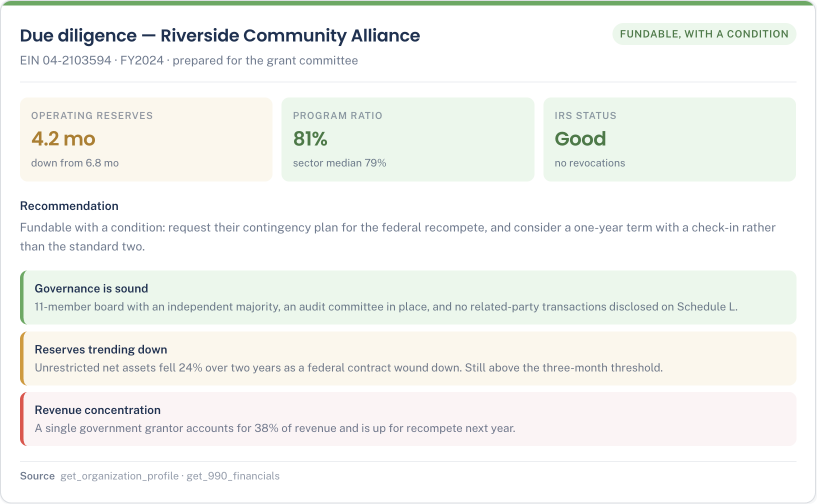
Grantee overview → board memo

Снимок экрана 2026-08-12 в 10.38.51 1
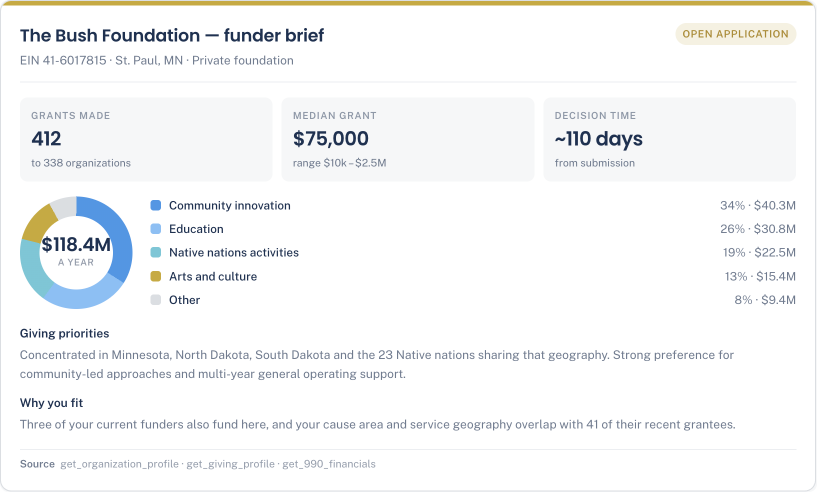
Funder deep-dive brief

Снимок экрана 2026-08-12 в 10.39.22 1
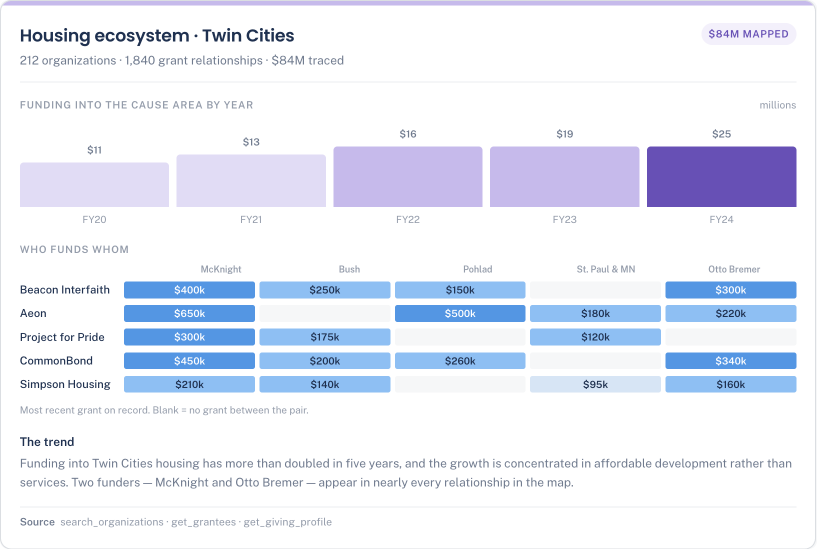
Market analysis

Снимок экрана 2026-08-12 в 10.39.50 1
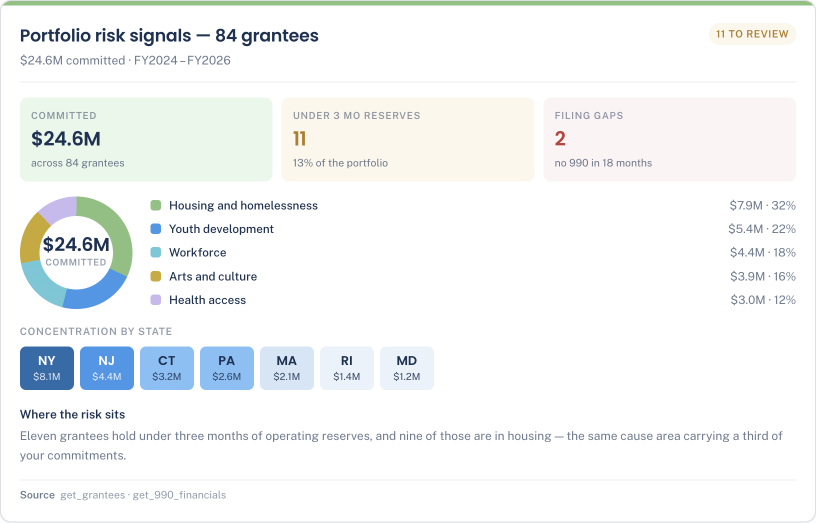
Portfolio risk signals

Снимок экрана 2026-08-12 в 10.40.18 1
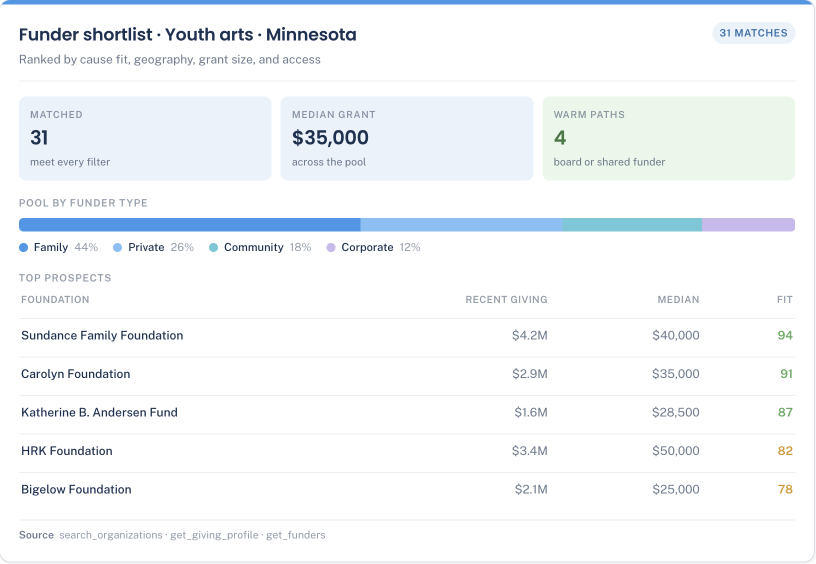
Funder shortlist

Снимок экрана 2026-08-12 в 10.40.52 1
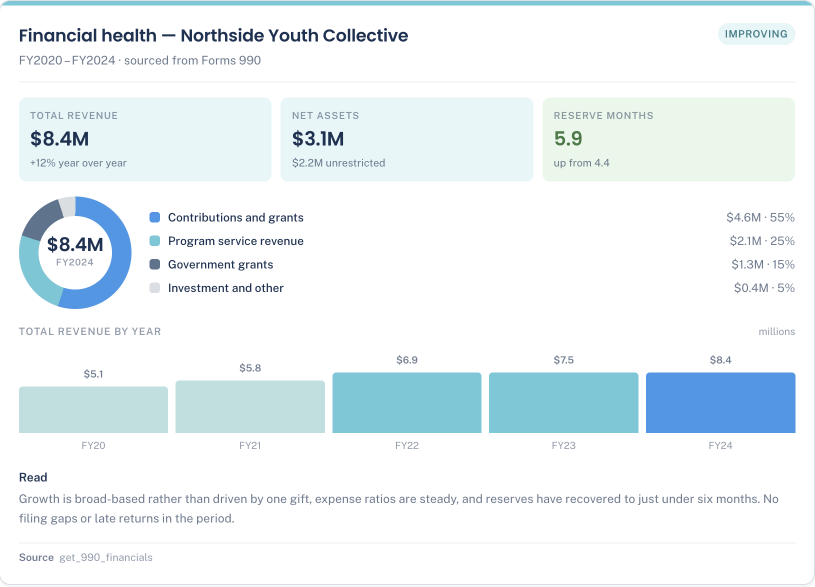
Financial health snapshot

"Impala's MCP changes how our team accesses and applies philanthropic intelligence. With this level of data at our fingertips, we're no longer toggling between platforms.

Instead, we're able to answer specific questions that are tailored to our needs with meaningful intelligence and data. For a foundation managing a complex portfolio, that kind of flexibility is genuinely transformative."

ceres foundation-1

Justin Stevens

Managing Director of Data
Jewish Federation Bay Area

Start using the MCP today

Connect in two minutes

1

Create your Impala account

Skip if you already have one. Signing up is free and takes about a minute — start here.

2
Admin, Once

Add Impala to your Claude organization

Go to Organization Settings → Connectors → Browse connectors, search "Impala," and click Add to your team. Individual plans skip this — just use the steps to the right.

https://mcp.impala.digital/mcp
3

Open Claude → Customize → Connectors

Search "Impala" in your connectors list — nothing to install, no config to paste.

4

Click Connect

Impala appears once your admin has added it (or right away, on individual plans).

5

Click Authorize

A browser tab opens with the Impala authorization screen. Approve it and you are sent straight back to Claude.

6

Start asking, and building!

Ask in plain English, and Claude answers straight from Impala. Connect once, and it works in Claude desktop, code, the web app, and mobile.

Watch the one-minute setup

Learn how to set up Impala's MCP in Claude

Included with your plan

No new bill. The MCP follows your subscription.

Impala's MCP is tied to your subscription. Whether you use the free version, or a premium one, you'll get access to the same data you can see and utilize on the Impala platform.

On a free account

$0

Access to Impala Essentials data:

  • Discovery across 2M+ nonprofits and 250K+ foundations
  • Financials (balance sheet, income statement, operating budget, etc.)
  • 16M board members and leadership
  • Core profiles, cause areas, programs, and IRS status
  • 990 summaries
  • A high fair-use limit, enough for real research

Then add the Impala connector to your AI agent of choice

Already a subscriber

No add-on fee

Everything from the free version, plus data from Impala's premium Philanthropy Database:

  • 25M+ individual grant transactions, given and received
  • Full 990 line items, multi-year, with ratios
  • Advanced giving analysis (geographies, grant sizes, ratio of new and continious grantees)
  • Funder overlap - how different foundations are funding the same grantees
  • Higher credit limit

Already subscribed? Just add the connector

SECURITY AND GOVERNANCE

Enterprise-grade security. Data you can trust.

Your account and your data are protected at every layer. Access is authenticated, permissions are enforced on our servers, and every answer traces back to a verifiable source. What your assistant can reach is exactly what your seat allows, and nothing else. 

pencil-off
Read-only by design

Impala can retrieve, never write. It cannot create, edit, or delete anything in your account, your lists, or your CRM. Your records stay exactly as you left them.

user-check
Authenticated access

There’s no anonymous access. You authenticate with your Impala account, and entitlements are enforced server-side. An assistant can’t reach data your seat can’t.

database-off
Not used for training

Your queries serve your request and are stored in a private audit log for your account. They are never used to train models, ours or anyone else's, and they are never shared.

file-check
Trusted and verified data

Results trace to IRS filings, and each one carries an EIN and a link back to its Impala profile.

How we Compare

Impala's MCP offers complete answers, not a teaser

Candid’s MCP covers the basics well. But when the question gets real, it hands your assistant a preview and a link back into the Candid platform. Impala hands it the whole record and doesn’t make you jump between platforms.

Nonprofit and funder search

Organization profiles

Aggregate giving totals

Individual grant transactions

990 financials

Board and leadership data

Landscape analysis

Grantee overview and portfolio monitoring

AI assistants supported

Custom builds and services

Where the answer lands

carbon_checkmark-filled

Yes — 2M+ nonprofits, 250K+ funders

carbon_checkmark-filled

Yes — profiles, programs, contacts

carbon_checkmark-filled

Yes — plus the detail behind them

carbon_checkmark-filled

25M+ transactions

carbon_checkmark-filled

Full line items, multi-year

carbon_checkmark-filled

16M board members and staff

carbon_checkmark-filled

Funders, flows and trends

carbon_checkmark-filled

Board-ready DD, grantee health

carbon_checkmark-filled

Any agent (Claude, ChatGPT, Gemini, Copilot, etc)

carbon_checkmark-filled

Our team builds your workflow

carbon_checkmark-filled

Complete, in your assistant

carbon_checkmark-filled

Yes — by name, mission, or EIN

carbon_checkmark-filled

Yes — profiles and sector knowledge

carbon_checkmark-filled

Yes — totals by funder

not-available-icon

Aggregate totals only via MCP

not-available-icon

Not via MCP (only in platform)

limited-icon

A search filter, not data

not-available-icon

Not via MCP (only in platform)

not-available-icon

Not via MCP (only in platform)

limited-icon

Claude only

not-available-icon

Not offered

not-available-icon

A teaser that takes into Candid

Available in your AI assistant
Limited
Not available via MCP

Based on each product's publicly documented MCP capabilities, August 2026. Both cover the United States.

Frequently Asked Questions

Impala is a pioneering software platform dedicated to democratizing social impact data.

Still have questions?

We're here to help you!

What is MCP, in one sentence?

The Model Context Protocol is an open standard that lets an AI assistant reach a trusted data source and call its tools directly — so instead of exporting data and pasting it in, your assistant fetches exactly what it needs, when it needs it.

Which assistants can I use?

Impala's MCP is available in every agent you choose: Claude (desktop, Code, and the web app), ChatGPT (Business, Enterprise, and Edu), Gemini, Copilot, etc.

How do I connect it?

Your workspace admin adds Impala once as a custom connector. It looks a bit different in each AI agent. For example, in Claude under Organization Settings, in ChatGPT under Workspace Settings after enabling developer mode. Everyone else then finds Impala in their own connectors list, clicks Connect, and authorizes with their Impala account. Nothing to install and no configuration to paste. It takes about 2 minutes. If you run into any problems, contact us at support@impala.digital

Do I need the admin of the AI agent?

Only for the first step. Someone with admin rights adds the Impala connector to your Claude organization or ChatGPT workspace once. After that every colleague connects on their own in about two minutes, and each person authorizes with their own Impala account.

Does it cost extra?

No. The MCP is included with your Impala account, free plans included. There is no separate MCP subscription. it simply returns what your current plan already covers, so access grows when you upgrade and narrows if you downgrade.

Do I need an Impala account?

Yes. There is no anonymous or public tier. You sign in with your Impala account when you add the connector, and every request is tied to it. Free accounts get Essentials data; subscribers get the full Premium depth.

Is this a teaser that sends me back to your platform?

No. You get the complete answer in your assistant, down to individual grant transactions, names of board members, and the organization's financials. This is not a summary that makes you click through. The platform and the MCP are one package: a destination you visit and a capability you carry.

Which Impala data can my assistant reach?

Organization discovery, full profiles, 990 financials, funders, grantees, aggregate giving, ecosystem mapping, due diligence, and portfolio monitoring — the same record that powers the platform. What you see follows what you subscribe to, so each product you add unlocks its own MCP capability.

Can I build a product on top of it?

Yes, and we would like you to. The same tools that answer a chat question can back an internal agent, a CRM enrichment job, a network dashboard, or a nightly briefing. Bring your own data, join it to ours, and tell us what you are building — we will help you scope it.

Are there rate limits?

Every plan carries a high fair-use limit, sized for real research rather than bulk extraction. If you are planning high-volume or automated use, talk to us first and we will set you up properly.

How is it secured, and where does the data come from?

The connection is read-only. It cannot create, edit, or delete anything in your Impala account. Entitlements are enforced server-side, and your queries are never used to train models. The data comes from IRS Forms 990s, 990-PF and 990-EZ, the IRS Business Master File and revocation list, and profiles verified by organizations themselves; every result carries an EIN and a link back to its source profile.

Put the whole sector behind every question you ask.

Add Impala to your assistant's connectors and sign in — about two minutes.

  • Actionable and insightful data
  • All-in-One Platform
  • Customized experience
Frame-1293 Frame-1293